Settings
Every answer you gave, editable, plus units, reminders, streaks, appearance, your data, help and your account.
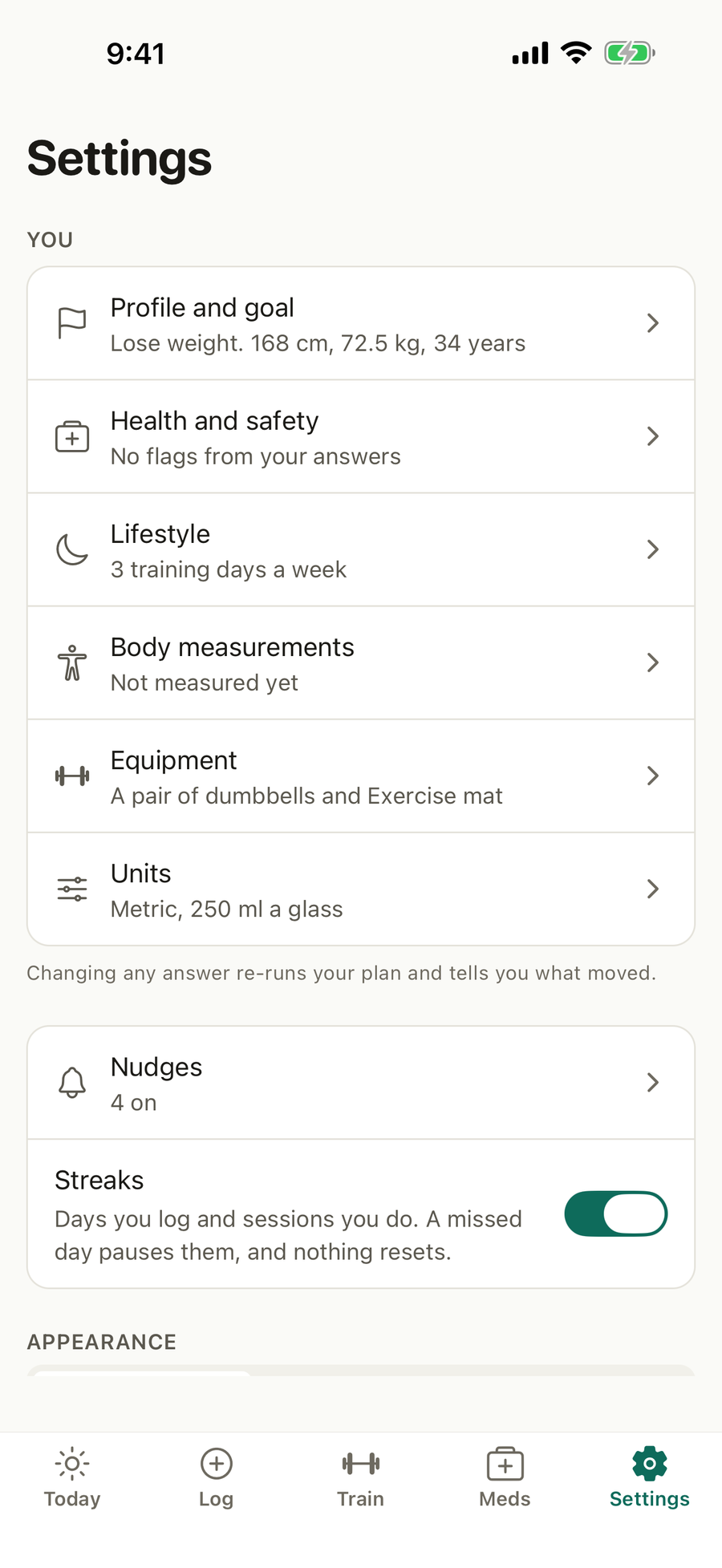
What’s on this screen
- You. Profile and goal, health and safety, lifestyle, body measurements, equipment and units, each with a summary of what is set.
- Nudges and Streaks. Your reminders, and the streak count on Today.
- Appearance. System, light or dark.
- Your data. Export my data, export for a spreadsheet, and import from a file.
- Help. Contact us and report a bug.
- About. The version, who is signed in, the privacy policy and terms with the version you agreed to, and a reminder that Apexevo is not medical advice.
- Delete account and Sign out.
What you can do
Change an answer
Open a section, change what you need and tap Save. Your plan updates and says what moved.
Profile and goal
Your name, goal, sex at birth, age, height, weight, a typical day, your training experience, and a target weight and date if you have them. Waist, body fat and resting heart rate are optional and sharpen the plan. If a date would need more than a safe pace, Apexevo says so and suggests one that works.
Health and safety
The full health check. If you took the quick start, saving it here finishes it.
Equipment
What you train with. Every session uses only this.
Units
Metric or imperial, and the size of your glass for water.
Nudges and streaks
Turn on the reminders you want and set their times, and turn streaks on or off.
Export, import and delete
Save your data as a file or a spreadsheet, bring an export back, or delete your account and everything in it.
Get help
Contact us sends a question or feedback. Report a bug adds your device details and up to two screenshots. A person reads each one and replies by email.
Good to know
- A preview can look at Settings but not change anything. Leave the preview takes you back to sign in.
- Signing out removes your data from the phone and from the home-screen widget.
Questions
If I change an answer, does my plan update?
Yes. Saving re-runs your plan and tells you what moved, and the weekly review lists the change.
Can I switch between kilograms and pounds?
Yes. In Settings, Units, choose metric or imperial and the size of your glass. Everything is stored the same way, so switching never changes your history.
How do I get my data out?
Export my data saves everything as one file, and Export for a spreadsheet saves a zip with a CSV file for each kind of entry. Import from a file brings an export back.
How do I delete my account?
Settings, Delete account. The screen lists everything that goes and offers an export first, then asks for your password once more. Your account and everything in it are deleted at once.
How do I report a problem?
Settings, Report a bug. Add what went wrong and up to two screenshots. Your phone, system and app version go with it so the answer can be exact.